Most LLM benchmarks highlight peak tokens per second.
That metric is incomplete.
For production systems — especially agentic workloads — what actually matters is:
• Where is the latency–throughput knee?
• How does the system behave under burst load?
• What is the sustainable request rate?
• What hardware constraint drives performance degradation?
To answer those questions, I benchmarked Mistral-7B-Instruct-v0.3 running on a single RTX 4090 (24GB) using vLLM in OpenAI-compatible mode.
The goal was not peak throughput.
The goal was capacity planning.
Test Configuration
Model
mistralai/Mistral-7B-Instruct-v0.3
Inference Server
vLLM (tokenizer-mode mistral)
GPU
RTX 4090 (24GB)
Workload A
256 input tokens → 128 output tokens
Workload B
512 input tokens → 256 output tokens
Arrival Model
Poisson distribution (burst-aware request pattern)
This approximates real-world agent workloads, where requests arrive unpredictably rather than at a perfectly constant rate.
Part 1 — Full Concurrency Sweep
Workload: 256 input → 128 output tokens
In this test, 300 prompts were sent with effectively infinite request rate to observe how throughput and latency change as concurrency increases.
Results
| Max Concurrency | Req/s | Output Tok/s | Mean TTFT (ms) | Median TTFT (ms) | P99 TTFT (ms) |
|---|---|---|---|---|---|
| 4 | 2.09 | 210 | 63 | 53 | 157 |
| 8 | 3.78 | 377 | 79 | 55 | 268 |
| 16 | 6.44 | 644 | 155 | 97 | 503 |
| 32 | 9.73 | 975 | 362 | 277 | 938 |
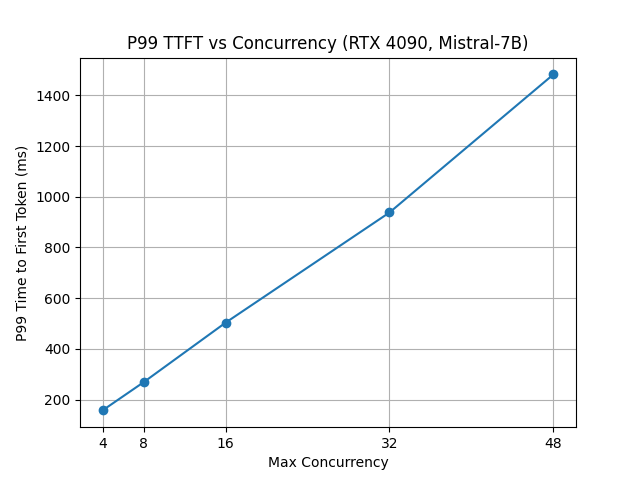
| 48 | 11.87 | 1190 | 667 | 840 | 1483 |
Observations
Near-Linear Scaling up to 16 Concurrency
From 4 → 8 → 16 concurrency:
• Throughput scales efficiently
• GPU utilization improves
• Latency increases moderately
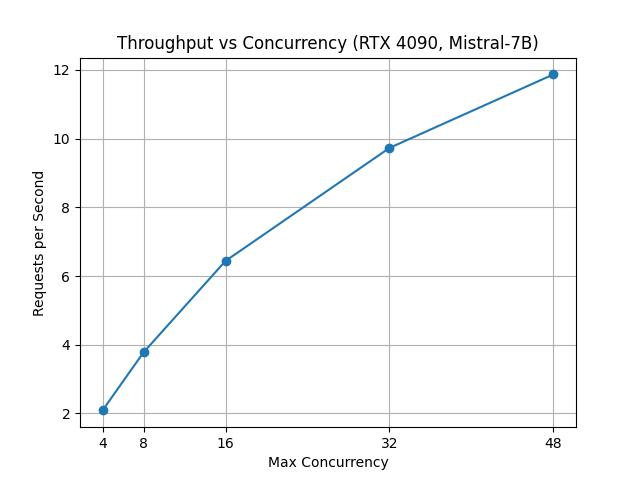
This indicates unused parallel headroom and effective dynamic batching by vLLM.
Diminishing Returns Beyond 16
From 16 → 32 concurrency:
• Request throughput increases roughly 50%
• Median TTFT nearly triples
• P99 TTFT doubles
From 32 → 48 concurrency:
• Throughput increases modestly
• Tail latency rises dramatically (P99 > 1.4 seconds)
This marks the latency–throughput knee.
Beyond this point, we trade user experience for marginal throughput gains.
Part 2 — Rate Sweep
Concurrency Fixed at 16
Workload: 512 input → 256 output tokens
In this experiment we fix maximum concurrency at 16 and vary the offered request rate.
The goal is to observe how the system behaves as it approaches saturation.
Results
| Offered RPS | Achieved RPS | Output Tok/s | Median TTFT (ms) | P99 TTFT (ms) |
|---|---|---|---|---|
| 2 | 1.64 | 240 | 76 | 169 |
| 5 | 3.90 | 569 | 76 | 225 |
| 10 | 3.98 | 584 | 76 | 331 |
| 15 | 3.98 | 583 | 87 | 467 |
| 20 | 3.98 | 589 | 87 | 520 |
Observations
Throughput Plateau
Beyond roughly 5 offered RPS:
• Achieved RPS stabilizes around ~4
• Output tokens per second stabilizes around ~580
• The system does not crash
• The system does not thrash
This is bounded capacity behavior.
The inference server simply reaches saturation.
Tail Latency Growth
As offered load increases:
• Median TTFT remains relatively stable
• P99 TTFT increases significantly
This is classic queueing theory behavior.
When systems exceed capacity, the result is tail latency inflation, not necessarily instability.
What Drives the Latency–Throughput Knee?
vLLM relies on PagedAttention to efficiently manage KV cache memory.
However, several hardware limitations still appear under load.
Prefill Phase Pressure
Higher concurrency increases memory bandwidth pressure during prompt ingestion.
Decode Phase Contention
Token generation introduces scheduler contention as more sequences compete for GPU execution.
GPU Memory Bandwidth Limits
Consumer GPUs such as the RTX 4090 often become bandwidth-bound before compute-bound.
This means the latency knee is primarily hardware-driven, not an arbitrary software limit.
The Context Multiplier
All results above assume:
• 256–512 input tokens
However, agentic systems (LangGraph pipelines, RAG retrieval, tool use) often expand context size significantly.
If input grows 4× (512 → 2000 tokens):
• Prefill cost increases roughly linearly
• Sustainable RPS drops proportionally
Example:
512 token context → about 4 RPS
2048 token context → about 1–1.5 RPS
Capacity planning must therefore consider average prompt length, not just request rate.
Deterministic Inference Node Model
With concurrency capped at 16, one RTX 4090 can sustain approximately:
• ~4 requests per second
• ~580 output tokens per second
• Sub-600 ms P99 time-to-first-token
This makes horizontal scaling predictable.
Example:
Nodes | Approximate RPS
1 | ~4
3 | ~12
5 | ~20
Assuming consistent prompt sizes, consumer GPUs can act as deterministic inference nodes.
Engineering Takeaways
- Throughput scales efficiently up to a hardware-defined knee.
- Beyond the knee, latency increases disproportionately.
- Bounded concurrency prevents instability.
- Tail latency — not tokens per second — defines user experience.
- Context length is a hidden capacity multiplier.
- Capacity ceilings are measurable.
Final Thoughts
This analysis is not about replacing large enterprise inference clusters.
It is about understanding:
• Hardware constraints
• Scheduler behavior
• Queueing effects
• Deterministic scaling envelopes
Tokens per second is a vanity metric.
Latency curves tell the real story.
Reproducing the Benchmark
This section provides the exact commands used to reproduce the experiments.
The setup uses the official vLLM OpenAI-compatible server running Mistral-7B-Instruct-v0.3 on a single RTX 4090.
1. Pull the vLLM Container
docker pull vllm/vllm-openai:v0.6.4
2. Start the vLLM Server
docker run --gpus all -it --rm \
-p 8000:8000 \
-v ~/.cache/huggingface:/root/.cache/huggingface \
vllm/vllm-openai:v0.6.4 \
--model mistralai/Mistral-7B-Instruct-v0.3 \
--tokenizer-mode mistral \
--max-model-len 4096
The server will start an OpenAI-compatible endpoint at:
http://localhost:8000/v1/completions
3. RunPod Alternative Setup
If you do not have a local GPU, the benchmark can be reproduced on RunPod.
Recommended configuration:
GPU: RTX 4090
Container Disk: 20 GB
Volume: 50 GB
Use the following start command:
--model mistralai/Mistral-7B-Instruct-v0.3
--host 0.0.0.0
--port 8000
--gpu-memory-utilization 0.90
--max-model-len 8192
--served-model-name mistral-7b
--tokenizer-mode mistral
After the pod starts, the inference server will be available at:
http://<runpod-ip>-8000.proxy.runpod.net/v1/completions
You can run the benchmark client from:
- your local machine
- another container
- the RunPod terminal
4. Enter the Container to Run Benchmarks
Open another terminal and attach to the running container.
docker exec -it <container_id> bash
Inside the container:
cd /vllm-workspace/vllm/benchmarks
5. Concurrency Sweep
The following benchmark measures throughput and latency across concurrency levels.
Example (concurrency = 16):
python3 benchmark_serving.py \
--backend openai \
--base-url http://127.0.0.1:8000 \
--endpoint /v1/completions \
--model mistral-7b \
--tokenizer mistralai/Mistral-7B-Instruct-v0.3 \
--dataset-name random \
--random-input-len 256 \
--random-output-len 128 \
--num-prompts 300 \
--request-rate inf \
--max-concurrency 16
Instead of running commands manually, you can run the full sweep automatically:
for C in 4 8 16 32 48; do
  echo "=== max_concurrency=$C ==="
  python3 benchmark_serving.py \
    --backend openai \
    --base-url http://127.0.0.1:8000 \
    --endpoint /v1/completions \
    --model mistral-7b \
    --tokenizer mistralai/Mistral-7B-Instruct-v0.3 \
    --dataset-name random \
    --random-input-len 256 \
    --random-output-len 128 \
    --num-prompts 300 \
    --request-rate inf \
    --max-concurrency $C
done
This produces the throughput vs concurrency results shown in the article.
6. Request Rate Sweep
This test evaluates overload behavior by fixing concurrency while increasing the offered request rate.
Example:
python3 benchmark_serving.py \
--backend openai \
--base-url http://127.0.0.1:8000 \
--endpoint /v1/completions \
--model mistral-7b \
--tokenizer mistralai/Mistral-7B-Instruct-v0.3 \
--dataset-name random \
--random-input-len 512 \
--random-output-len 256 \
--num-prompts 400 \
--max-concurrency 16 \
--request-rate 5
To run the full sweep automatically:
for R in 2 5 10 15 20; do
  echo "=== request_rate=$R @ max_concurrency=16 ==="
  python3 benchmark_serving.py \
    --backend openai \
    --base-url http://127.0.0.1:8000 \
    --endpoint /v1/completions \
    --model mistral-7b \
    --tokenizer mistralai/Mistral-7B-Instruct-v0.3 \
    --dataset-name random \
    --random-input-len 512 \
    --random-output-len 256 \
    --num-prompts 400 \
    --request-rate $R \
    --max-concurrency 16
done
This produces the capacity plateau results described earlier.
Leave a Reply